Liaison Reply

15 free generations Nothing ever auto-sends You stay in control of every word

WHEN THE MESSAGE FEELS LOADED

When the message feels loaded, paste it and see three better ways to reply.

Liaison Reply slows the moment down so you can answer difficult texts with more clarity and less regret.

Live mobile app

Your actual dashboard

Liaison Reply mobile compose dashboard showing history and new thread controls, persona selection, message input, context controls, and bottom navigation.

Dashboard view

See the actual product before you decide.

See exactly what you will use: the dashboard, composer, quick-start, and navigation in the app you actually use.

  • What the actual dashboard looks like
  • Real compose and persona features
  • Not a mockup — the real app

Slow the moment down. Reply with clarity, not regret.

  • Paste the message and compare Natural, Keep it going, and Short
  • Nothing ever auto-sends. You stay in control of every word.
  • 15 free generations so you can feel the difference before you upgrade
15 free generations Nothing ever auto-sends You stay in control

HOW IT WORKS

Three steps between panic and a better reply.

Paste the exact message, compare three reply options, and send it yourself only after it sounds right.

  1. 1
    Paste the incoming message

    Drop in the exact text plus any context that changes the meaning.

  2. 2
    Compare three reply styles

    See different angles so you can de-escalate, keep things open, or hold a boundary more cleanly.

  3. 3
    Edit, copy, and send it yourself

    Nothing sends automatically. You make the final call on every word and every send.

LIVE DEMO

See reply generation and coaching in the real app.

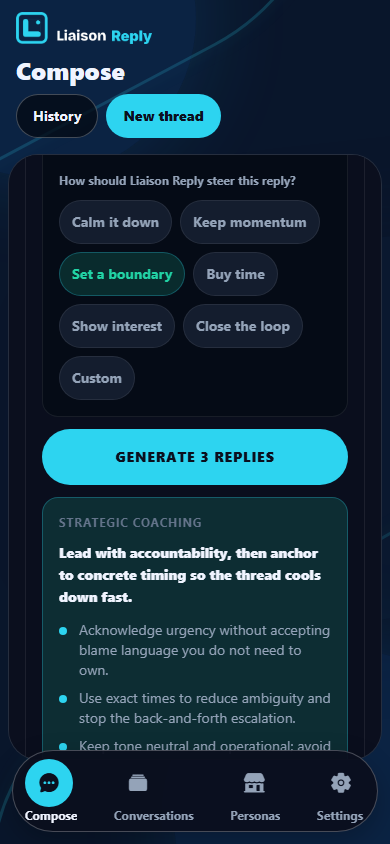
Real screenshots from a high-pressure thread: paste the message, set intent, generate three replies, polish the best draft, and get live coaching before send.

Reply builder

Slide 1 of 8

Compose screen with a heated incoming message pasted into Liaison Reply.
1 / 8

Step 1: Paste the message

Paste the exact message.

Use the exact text as received. Liaison Reply works from what was said, not a summary.

Nothing auto-sends. This walkthrough shows exactly how Liaison Reply works - real UI, real flow, no scripts.

WHAT MAKES THIS DIFFERENT

Three routes to a reply, and only one is built for control.

Liaison Reply is designed to preserve your voice while giving you structure. That is different from spiraling alone or dumping the problem into a generic chat box.

Replying alone

Spiral, over-explain, or go silent.

The pressure sits entirely on you, and the first draft tends to come from urgency instead of judgment.

Generic AI chat

Plausible text, but no clear reply structure.

You get one stream of output with no built-in angles, so your voice can disappear into something polished but generic.

Liaison Reply

Three clear angles, your voice preserved.

Compare Natural, Keep it going, and Short. Edit the one that fits, then send it yourself only if it sounds right.

Secure by default Nothing sends automatically
Stripe checkout PCI-compliant billing
Supabase secured Encrypted database

PROOF BEFORE PRICING

See the trust signals before you decide to try it.

Liaison Reply is explicit about control, billing, and what happens next, so you do not have to guess how the workflow works.

Try it free first

15 free generations

Enough room to feel the workflow before deciding whether Pro belongs in your routine.

Manual control

Nothing auto-sends. Liaison Reply drafts options, then hands the final wording back to you.

Best for people who want help without handing over authorship.

Straight billing

Start free first. If you upgrade, billing and subscription management still run through Stripe.

Clear pricing, clear billing, and self-serve changes without emailing support.

Built for real stakes

Work conflict, dating ambiguity, and family boundaries stay on the page because those are the moments where wording matters.

You can see the use cases, the mechanics, and the product flow before choosing whether to try it.

You stay in control

Nothing auto-sends. Liaison Reply drafts options. You review, edit, copy, and decide what actually gets sent.

Billing is straightforward

Checkout and subscription management run through Stripe. Cancel or switch billing from the customer portal.

Privacy is explicit

Only what you choose to save remains in your account. Threads, billing, and support links stay visible in the footer.

Proof is grounded

The walkthrough shows a realistic message-to-reply flow, so you can see how Liaison Reply helps before you try it.

TRANSPARENT PRICING

Start free. Upgrade when you want more help handling difficult conversations.

Use the free tier to see whether Liaison Reply helps you think more clearly in tough moments. If it does, choose the Pro plan that fits how often you use it.

PRO MONTHLY

$7.99 /mo

Pay month to month

Best if you want consistent help without committing to a year

  • Unlimited generations for normal use
  • Full conversation memory for tougher threads
  • All premium personas unlocked
  • Priority support and Stripe self-serve billing
Choose Monthly & Keep Generating Replies

Unlimited generations are for normal use and subject to fair-use abuse guardrails. We will keep monthly selected when you sign up and check out.

PRO YEARLY

$79.99 /yr

$6.67/month effective, save 17%

Best value if you use Liaison Reply often

  • Everything in Pro monthly
  • Lower effective monthly cost
  • Best if Liaison Reply is part of your routine
  • Priority support with the strongest value
Choose Yearly & Keep Generating Replies

Unlimited generations are for normal use and subject to fair-use abuse guardrails. We will keep yearly selected when you sign up and check out.

FAQ

Questions before you start.

Clear answers about how it works, what you pay for, and what stays in your control.

What exactly is Liaison Reply?

Liaison Reply is an app that helps you answer difficult texts. You paste the message, review three reply options, edit the one that fits, and send it yourself.

Does anything auto-send?

No. Liaison Reply never sends on your behalf. You review, edit, copy, and decide what goes back into the conversation.

What do I get with the free tier?

You get 15 free generations so you can test the full workflow before paying. That is enough to see whether the product helps you think and reply more clearly.

What changes when I upgrade to Pro?

Pro gives you more room to keep going when the conversation gets difficult, plus deeper memory, premium personas, and priority support for higher-stakes situations.

Paid plans still include fair-use and misuse protections.

How is billing handled?

Billing and subscription management run through Stripe. You can manage billing, change intervals, and cancel from the customer portal.

Can I cancel or switch plans later?

Yes. You can manage your subscription through Stripe at any time, including cancellation and billing interval changes.

What happens to my messages and data?

Right now, Liaison Reply runs on the web. Nothing auto-sends, and only the content you choose to save stays in your account.

Why the name Liaison Reply?

The product helps you slow down, read the moment clearly, and choose a stronger response before anything gets sent. The name reflects the real job: helping you reply with more clarity, judgment, and control in high-stakes conversations.

Who is Liaison Reply best for?

People who need help answering loaded messages at work, in dating, or with family without freezing, spiraling, or firing off something they regret.

Paste one loaded message and see three better ways to reply.

Start free, compare the options, and keep every send under your control.